
Princess Nail Art Studio
Developer: Foam Shift Works
Published: 2026-07-21
Updated: 2026-07-21
About
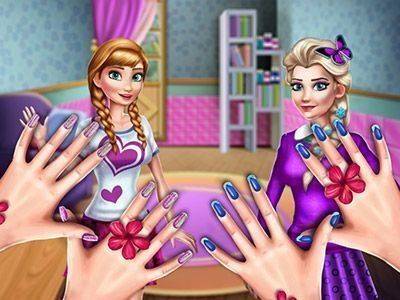
Princess Nail Art Studio offers a calming space where children can explore color and pattern without any competitive elements. The touch controls are responsive, and the undo feature removes frustration. The variety of stickers and gems keeps each session interesting, while the ability to save designs gives a sense of pride. It is a well-crafted tool for fostering creativity in young players.
A Relaxed Space for Creative Expression
This game invites players into a bright salon where the focus is on artistic freedom. Instead of following strict rules, users can experiment with different color combinations and decorative elements. The interface is simple, making it easy for younger players to pick up and enjoy. There are no timers or scores, just a peaceful environment where imagination leads the way. Each session offers a fresh opportunity to try something new, whether that means mixing unusual shades or layering patterns.Selecting Characters and Building Designs
Players begin by choosing from several princess characters, each with their own look and feel. This selection adds a personal touch to the experience, as users can match nail art to the character's style. From there, the design process unfolds naturally: pick a nail shape, select a base color, and then add details like stripes, dots, or glitter. The tools respond smoothly to touch, allowing for precise placement of stickers and gems. If a mistake happens, an easy undo option keeps the process stress-free.Color Palette and Decorative Options
The range of colors available is broad, covering soft pastels, bright neons, and rich jewel tones. Beyond simple polish, players can apply glitter effects that catch the light, place tiny stickers shaped like flowers or stars, and attach sparkling gems for extra flair. These elements can be combined in countless ways, encouraging repeated play. The variety ensures that no two designs need to look alike, and players can always find new inspiration by browsing the available options.Encouraging Fine Motor Skills Through Play
While the game is primarily about fun, it also supports the development of fine motor coordination. Selecting small decorations, applying them precisely, and correcting mistakes all require careful hand-eye coordination. This makes the activity suitable for children who are building these skills, as well as for anyone who enjoys a gentle, hands-on creative task. The forgiving nature of the tools means that even less experienced players can achieve satisfying results without frustration.Saving and Sharing Creations
Once a design is complete, players can save their work to revisit later or to show friends and family. This feature adds a sense of accomplishment and gives users a gallery of their own artistic progress. The saved designs can serve as inspiration for future projects, and the ability to start over at any point keeps the experience open-ended. There is no pressure to finish quickly, so each session can be as long or as short as the player desires.Compatibility
▸ Desktop: Chrome / Edge / Firefox / Safari
▸ Mobile: iOS Safari / Android Chrome
▸ Tablet: iPadOS Safari / Android Tablet Browser
Keep your browser updated for the best experience
FAQ
Is Princess Nail Art Studio free to play?
The game is free to play with optional in-game purchases for additional decoration packs. The core experience, including all basic colors, stickers, and gems, is available without any cost. Players can enjoy unlimited design sessions without spending money.
What age group is this game designed for?
This game is designed for children aged 4 to 12, but it can be enjoyed by anyone who likes creative activities. The controls are simple enough for young children, while the variety of design options keeps older kids engaged. There is no reading required, making it accessible to pre-readers.
Can I play this game on a tablet or phone?
Yes, the game is optimized for touch screens on tablets and phones. The interface is responsive and buttons are large enough for small fingers. It also works on desktop computers with mouse controls. An internet connection is not required after the initial download.
How many princess characters can I choose from?
The game includes a selection of princess characters, each with a distinct color scheme and personality. The exact number may vary, but there are enough options to keep the experience fresh. Additional characters may be added through updates or unlockable content.
Are there any time limits or scoring in this game?
No, there are no time limits, scores, or levels. The game is designed to be a relaxing, open-ended creative experience. Players can take as long as they want on each design and can stop at any point without penalty. This makes it a stress-free activity.
Can I save my designs to show them later?
Yes, completed designs can be saved to a personal gallery within the game. This allows players to view their past work, compare styles, and share their creations with friends or family. Saved designs can also be used as inspiration for future projects.









Comments
Sign in to comment
You must be logged in before posting a review or rating.
No account? Create one
No comments yet. Be the first to comment!