
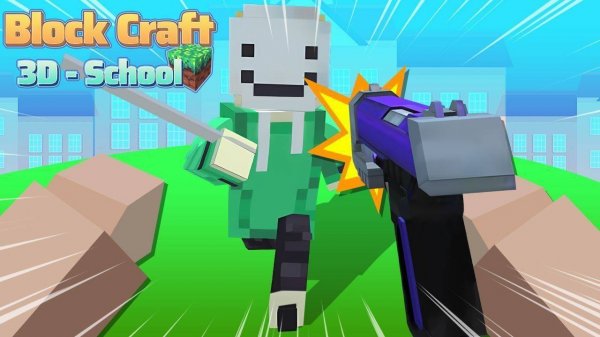
Block Craft 3D School Creator
About
Block Craft 3D School Creator offers a relaxing and engaging building experience. The pixel art style is charming, and the exploration element keeps things interesting. It is easy to pick up for beginners but offers enough variety for experienced builders. The family-friendly nature makes it a safe choice for children, and the lack of time pressure allows for creative freedom. A solid choice for anyone who enjoys sandbox construction games.
Game Introduction
Block Craft 3D School Creator invites players into a colorful pixel world where creativity leads the way. The game centers on constructing a school from scratch. Players gather materials, design classrooms, playgrounds, and libraries, and bring their educational vision to life. Exploration adds depth, as the surrounding lands hide new resources and secrets. Each session feels fresh, encouraging players to experiment with layouts and decorations. The experience is wholesome, blending construction with light adventure in a safe, family-friendly setting.
How to Play
Players use touch controls to select block types from their inventory. They place blocks in the world to build walls, floors, and decorations. Exploring the map reveals more blocks and helpful items. Playful cartoon characters may try to disrupt the school, but players can avoid them or use in-game tools to gently deter them. The core loop involves exploring, collecting, building, and protecting creations. The challenge remains light and the fun high.
Game Features
Creative building with various block types. Exploration of a vibrant pixel world. Resource collection for construction. Light adventure with friendly challenges. Family-friendly gameplay suitable for all ages.
Tips for Success
Take time to explore the map fully to find rare blocks and items. Plan your school layout before building to make efficient use of space. Experiment with different decorations to make your school unique. Regularly save your progress to avoid losing work.







Comments
Sign in to comment
You must be logged in before posting a review or rating.
No account? Create one
No comments yet. Be the first to comment!